
 Design
 Vue
Vue Flutter
Anatomy
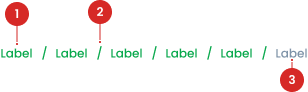
Separator is used to separate each level in the breadcrumb.
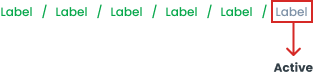
Indicates which page it is currently on and cannot be clicked on.
States
Active State
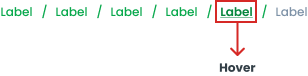
Hover State
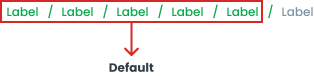
Default State
Usage
The following are some common uses for the breadcrumbs component in web and application design:
- Display a hierarchy of pages with a structure of more than two levels.
- Facilitate navigation back to the previous page or to a higher hierarchy level.
- Improve user experience especially in applications or websites with complex structures.
Placement of breadcrumbs at the top of the page helps improve navigability and overall user experience.

Accessibility
Hover Effects
Provide clear visual feedback when users use the pointer or keyboard on the breadcrumb.
Content
Each link in the breadcrumb above should point to a unique page. Users should be able to click on each breadcrumb section to go directly to the corresponding page, such as the Home page, Product Category page, and so on. Because the "Culture" page does not have a separate page so it does not need to be written in breadcrumbs


Separators in breadcrumbs are used to distinguish between each page.


Writing labels on breadcrumbs must be short and clear and in accordance with the intended page.


Usage
The package is already installed in the repository's shell. To use the component, you only need to add the following code:
<BBreadcrumb :items="items" />
Attributes
If there is a question mark ? in the Data Type, it means that the properties are optional.
| Properties | Data Type | Description |
|---|---|---|
| items | Item[] | label for button label |
Item
The <BBreadcrumb /> items must be defined using the following structure. If there is a question mark ? in the Data Type, it means that the properties are optional:
| Property | Data Type | Description | Default Value |
|---|---|---|---|
| label | string | Breadcrumb label | none |
| route | string | Breadcrumb hyperlink | none |
| disabled? | boolean | Disable the breadcrumb item if | false |