
Buma UI - DocumentationBuma UI - Documentation
Get Started
Foundations
Components
Resources
Patterns
Data Visualization
Back to BSpace
Get Started
Foundations
Components
Resources
Patterns
Data Visualization
  • stacksFoundations
    • 💡 Overview
    • Color
    • Principle
    • Typography
  • brickComponents
    • 💡 Overview
    • Accordion
    • Alert
    • Avatar
    • Badge
    • Bottom Sheet
    • Bread Crumb
    • Button
    • Button Link
    • Button Navigation
    • Calendar
    • Card
    • Chat
    • Checkbox
    • Chips
    • Choice Tile
    • Comment
    • Date Picker
    • Divider
    • Download
    • Drawer
    • Dropdown
    • Empty State
    • Floating Button
    • Form Input
    • Header
    • Hint
    • Icon
    • List Choice
    • Loading
    • Modal
    • Navigation Bar
    • Notification
    • Pagination
    • Progress Bar
    • Radio Button
    • Search
    • Scrolling Bar
    • Segmented Switch
    • Side Menu
    • Side Tab
    • Slider
    • Switch
    • Tab
    • Table
    • Text Area
    • Text Input
    • Time Picker
    • Title
    • Toast
    • Tooltip
    • Wizzard
  • splitscreenPattern
    • 💡 Overview
    • Filter
      upcoming
    • Form
      upcoming
    • Notification
    • PWA
      upcoming
    • table
      upcoming
    • Upload Download
      upcoming
  • insert_chartData Visualization
    • 💡 Overview
    • Tiering
    • Pattern
    • Chart and Graph
      • Chart Selection Guide
      • Map Selector
      • Donut Chart
      • Donut Progress Bar Chart
      • Spider Chart
      • Line Chart
      • Chart Area
      • Speedometer
      • Heat Map
      • Scatter Plot
      • Pie Chart
      • Bar Chart
      • Waterfall Chart
      • Sunburst Chart
      • Tree Decomposition Chart
      • Scorecards
      • Table
      • Micro Visualization
    • Typography
    • Color Palette
  • data_objectTokens
    upcoming
  • inventory_2Resources
    • 💡 Overview
    • Mobile
      new
      • 💡 Introduction
      • Installation
      • General
        • Important Rules
        • Naming Convention
        • Clean Architecture
    • Web
      upcoming
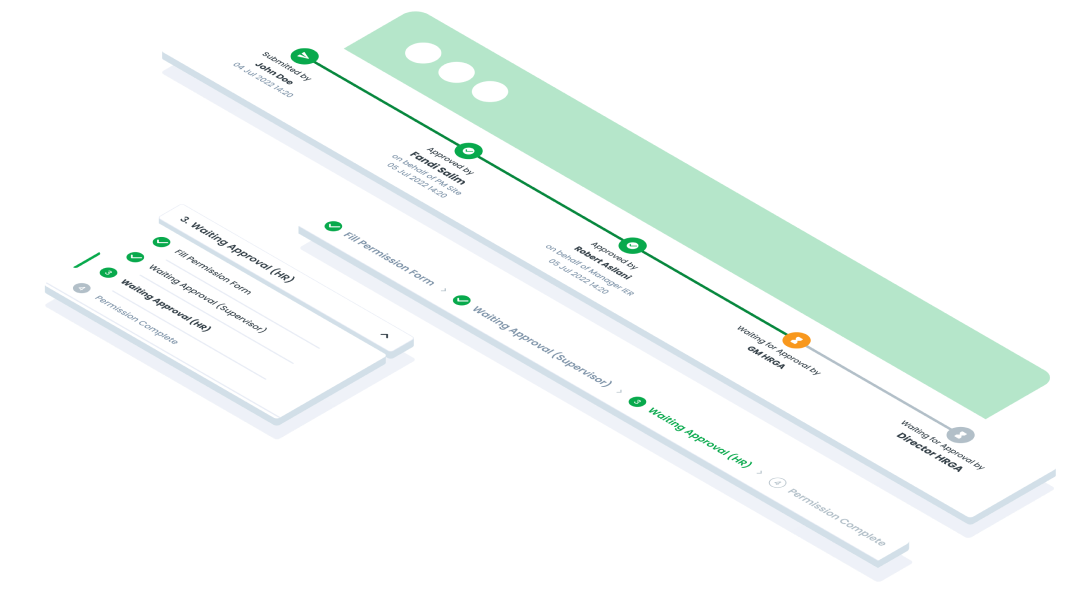
ComponentsWizzardThe Wizard component is a user interface (UI) element that divides complex processes into sequential, manageable steps.
Guidelines
Web
Mobile
Resources
  • You can use these components by accessing the provided resource files.
  • Preview animations are examples and may not suit Mobile Widgets. Press 'View Code' to access the Widgetbook Playground and see the Flutter widget displaying all created components and interactive.

Usage

Import this line to your file:

import 'package:buma_design_system/buma_design_system.dart';

Attributes of all variants

If there is a question mark ? in the Data Type, it means that the properties are optional, this is namedConstructor from UIWizzard.

UIWizzardNumber

The wizzard to displays sequential steps in a process.

With each step labeled with a corresponding number. Users navigate through the steps in numerical order, completing tasks or providing information as they progress. Place this wizard on the top of the screen.

PropertiesData TypeDescription
currentIndexintDisplays current index of numbers
listDropDownList<T>?Displays list of dropdown menus
onTapDropDownvoid Function(T itemDropDown)?Callback when user tap dropdown wizzard
onTapNextPagevoid Function()?Callback when user tap next number
onTapPreviousPagevoid Function()?Callback when user tap previous number
numbersList<UIWizzardNumberItem>?Collection numbers of Wizzard
UIWizzardTracking

The wizzard to track user progress and completion status, withing a multi-step process or workflow.

It provides visual feedback on which steps have been completed and which are in progress.

PropertiesData TypeDescription
itemsList<UIWizzardTrackItem>A list of items to be tracked in the wizard. Each item is an instance of UIWizzardTrackItem
isDashedTrackboolA flag indicating whether the track should be dashed. If true, the track will be displayed with dashed lines
UIWizzardNumber
UIWizzardTracking
arrow_back
Previous Tooltip